Mermaid and diagram-design
Good integration docs need diagrams: how a partner's delivery moves from submission to launch, and what the API says back when a payload is wrong. I wanted to know if two tools could share that work. Mermaid is text-first and renders on GitHub. diagram-design is an agent skill that draws polished diagrams and says it can import Mermaid.
The short answer: they work well together if you treat Mermaid as the source and diagram-design as the presentation layer. Nothing flows back the other way.
How each tool works #
Mermaid on GitHub. Put a fenced code block marked mermaid in any Markdown file and GitHub draws it. GitHub's HTML pipeline swaps the block for a placeholder, then an iframe to its Viewscreen service runs Mermaid.js in your browser. Without JavaScript, including the REST Markdown API, you see the code. I checked: gh api markdown returns the block as highlighted source. The diagram lives next to the docs, so it gets reviewed and edited like code. The layout is automatic, and it looks like it.
diagram-design. This is a skill for coding agents such as Claude Code, Codex and Copilot. It writes one HTML file with an inline SVG, following strict rules: 45 diagram types, a budget of 9 nodes and 12 arrows, right-angle connectors only, labels on opaque masks clear of their lines, one or two accent elements, and an accessible title and description on every figure. It comes with Python checkers for those rules and an SVG exporter.
The import path is the important part. The skill never renders Mermaid. mermaid_extract.py parses the text into a digest (nodes, edges, decisions, cycles, hubs, budget) without executing anything. The agent then redraws from scratch and reports a fidelity ledger: everything it merged, renamed or dropped. It doesn't write Mermaid back.
The test #
I wrote two Mermaid diagrams of a generic partner content delivery and ran them through the skill's import procedure. The skill was pinned to commit 97d7951 (v2.6). I skinned it with this blog's colours and system fonts, so the published images make no network requests. Here is the flowchart source, which GitHub renders in the repository:
flowchart LR
  P([Partner]) -->|POST package| A[Authenticate submission]
  A --> V{Schema valid?}
  V -- no --> R[Remediate with partner]
  R -->|resubmit| A
  V -- yes --> O[Orchestrate metadata, artwork, video]
  O --> M[(Metadata store)]
  O --> AV[Set availability window]
  AV --> L([Ready to launch])
This is Mermaid's own default render, from Mermaid CLI 12.0.0 with Mermaid 12.2.0 (GitHub runs its own version, so its render will differ a little):


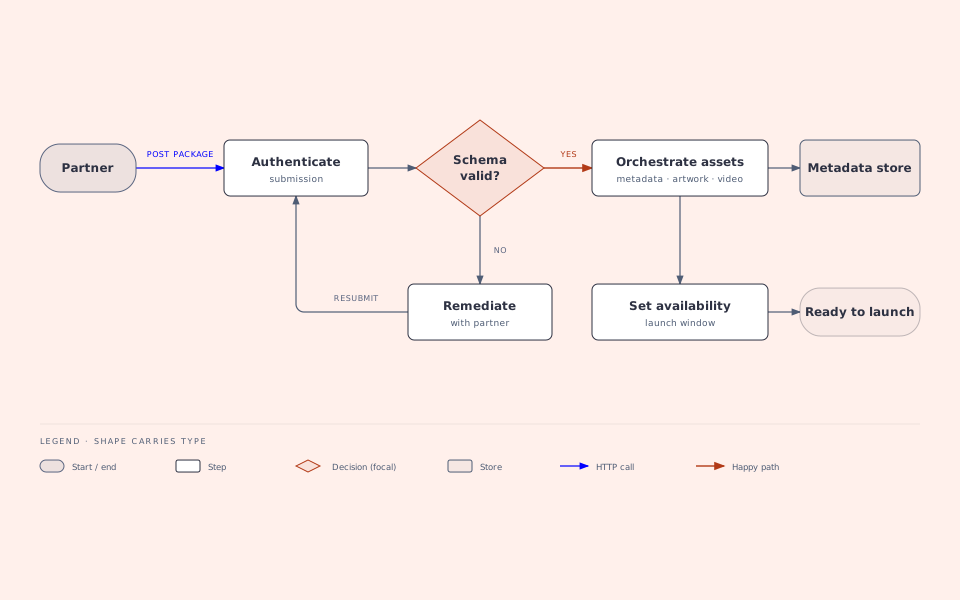
And the diagram-design redraw:

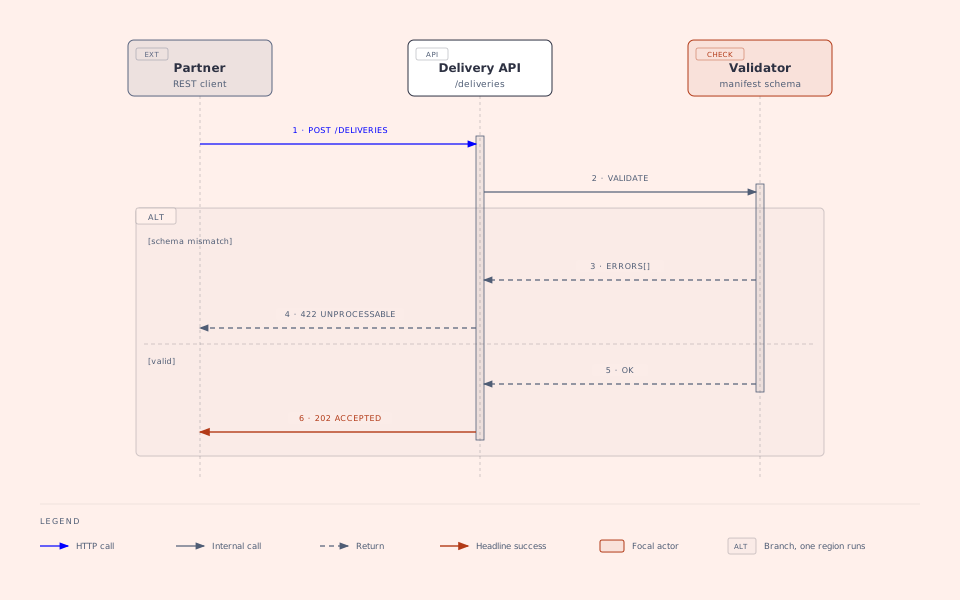
The second diagram is the API exchange behind "Schema valid?": a sequenceDiagram with an alt block for 422 versus 202.

What worked #
- The extractor read both diagrams correctly. For the flowchart it reported 8 nodes, 8 edges, one decision, the remediation cycle, the entry (Partner) and two terminals, all within budget. For the sequence it kept the
altbranches andautonumber, so step numbers survive the redraw. - Fidelity was easy to audit. Every source node and edge is in the redraw: 8/8 nodes and 8/8 edges, then 3/3 lifelines and 6/6 messages. Only labels changed. Long names became a name plus a small technical sublabel ("Orchestrate assets" with "metadata · artwork · video"). Arrow labels were shortened ("POST /deliveries (JSON manifest)" became "POST /DELIVERIES"). I rewrote "Set availability window" as "Set availability" plus "launch window", and the ledger records that change.
- The checkers catch real mistakes. When I added a diagonal connector and pushed a label under a box,
verify-geometry.pyflagged both.self_check.pyfailed a figure whose accessible name didn't point at its title. - The output is small and portable. Each redraw exports as a single SVG of about 10 KB with no scripts and no font downloads. The same file works as an image on GitHub, which strips inline SVG from Markdown. Mermaid CLI's default output for the flowchart is about 290 KB, more than half of it an embedded font.
Where it falls short #
- It only goes one way. Edit the Mermaid and the redraw is silently stale. I handle that with a manifest that stores a hash of each Mermaid block.
npm run diagrams:checkfails until the redraw is updated and re-exported. - Only four Mermaid kinds are supported: flowchart, sequence, state and ER. A
pieblock exits with "unsupported diagram kind", and so wouldgantt,mindmaporgitGraph. The skill draws those chart types itself, but you would describe them in prose, not import them. - The checks are incomplete. A label sitting on its own arrow, which the skill's rule 2 forbids, passes
verify-geometry.py. One of the skill's own sequence examples also breaks its 14-character label limit and its 6px label gap. You still need to look at the result. - The redraw is hand-placed SVG. An agent (here, me with the skill's rules) works out every coordinate. That's why it looks good, and also why it takes far longer than typing Mermaid. Above 9 nodes the skill tells you to split the diagram.
- Small type shrinks in a narrow column. The skill sets 8px labels on a 960px canvas. In this blog's 600px column they draw at about 5px, so each image links to the full-size SVG.
- Branding isn't stored in the repo. Saved skins live in
~/.diagram-design/profiles/, and a project can only name one. I committed the blog's skin as a profile to copy in.
Verdict #
Use both, for different jobs. Keep Mermaid in the repository as the source of truth: it renders on GitHub, reviews like code, and anyone can edit it. When a diagram is going in front of people (a partner integration guide, a launch review, a blog post), run it through diagram-design for the polished copy. Pin the skill version and add a check that fails when the copy drifts from its source.
The sources, redraws and check script are in the blog's repository.